Angle, Rotation, Orientation
-
 In a nutshell...
- An
Angleis expressed in degrees, and can be created implicitly from afloat(e.g.90f). Angle - A
Rotationis a turn of a givenAnglearound an axisDirection(e.g.90f % Direction.Up). It describes a change of direction, not a direction itself. Rotation - The
Orientationenums name the 26 directions made of Left/Right, Up/Down, and Forward/Backward (e.g.Orientation.LeftUp). Orientation
- An
Angle#
An Angle is an amount of turn. TinyFFR ostensibly works in degrees; every float you pass as an angle, and every value you read back (unless stated otherwise), is in degrees.
Angle Internals
Internally an Angle is stored in radians, as that's what the underlying math operations use. Its public API converts to and from degrees, so you can think of every Angle as being in degrees.
Angle quarterTurn = 90f; // (1)!
var alsoQuarterTurn = new Angle(90f); // (2)!
var fromRadians = Angle.FromRadians(MathF.PI); // (3)!
var halfCircle = Angle.HalfCircle; // (4)!
var between = direction1 ^ direction2; // (5)!
-
A
floatconverts implicitly to anAnglein degrees, so anywhere anAngleis expected you can simply write a number. -
The same, using the constructor.
-
180°, created from radians.
Angle.FromFullCircleFraction(0.5f)gives the same result. -
Built-in constants:
Zero,EighthCircle,SixthCircle,QuarterCircle,ThirdCircle,HalfCircle,ThreeQuarterCircle, andFullCircle. -
The angle between two directions (from 0° to 180°). Equivalent to
Angle.FromAngleBetweenDirections(direction1, direction2).
-
Degrees/Radians/FullCircleFraction -
The angle in degrees, in radians, or as a fraction of a full circle (e.g. 180° is
0.5f). -
Sine/Cosine -
The sine and cosine of the angle.
Angle.FromSine()andAngle.FromCosine()go the other way. -
Normalized -
The equivalent angle between 0° and 360° (e.g. -90° becomes 270°, and 450° becomes 90°).
-
Absolute/Negated -
The angle with any minus sign removed, or with its sign flipped. The unary
-operator also negates:-angle. -
ShortestDifferenceTo(other) -
The smallest angle between this angle and
otherwhen both are treated as positions around a circle, always between 0° and 180°. For example, between 315° and 45° it's 90°, not 270°.
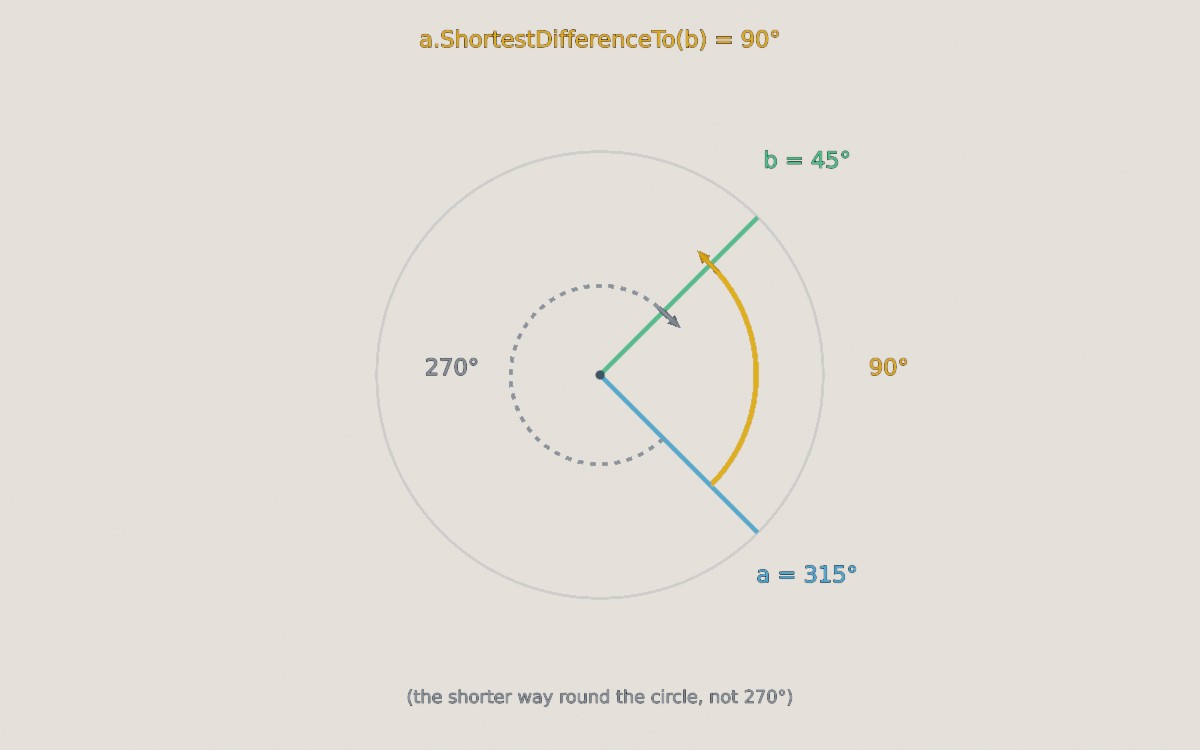
The shortest difference between 315° and 45° is 90° (the orange arc), rather than the 270° you'd get by going the other way round (the dashed arc).
-
Clamp(min, max)/ClampZeroToHalfCircle()/ClampZeroToFullCircle()/ClampNegativeHalfCircleToHalfCircle()/ ... -
Restricts the angle to a range.
-
Triangularize(peak)/TriangularizeRectified(peak) -
Treats this angle as a position along a triangle wave that rises to
peak, falls to-peak(or to 0°, for the rectified version), and rises again, returning the wave's value. This is handy for making something swing back and forth at a constant speed: Feed in an angle that increases over time (e.g.loop.TotalIteratedTimemultiplied by some speed), and use the result to rotate something.
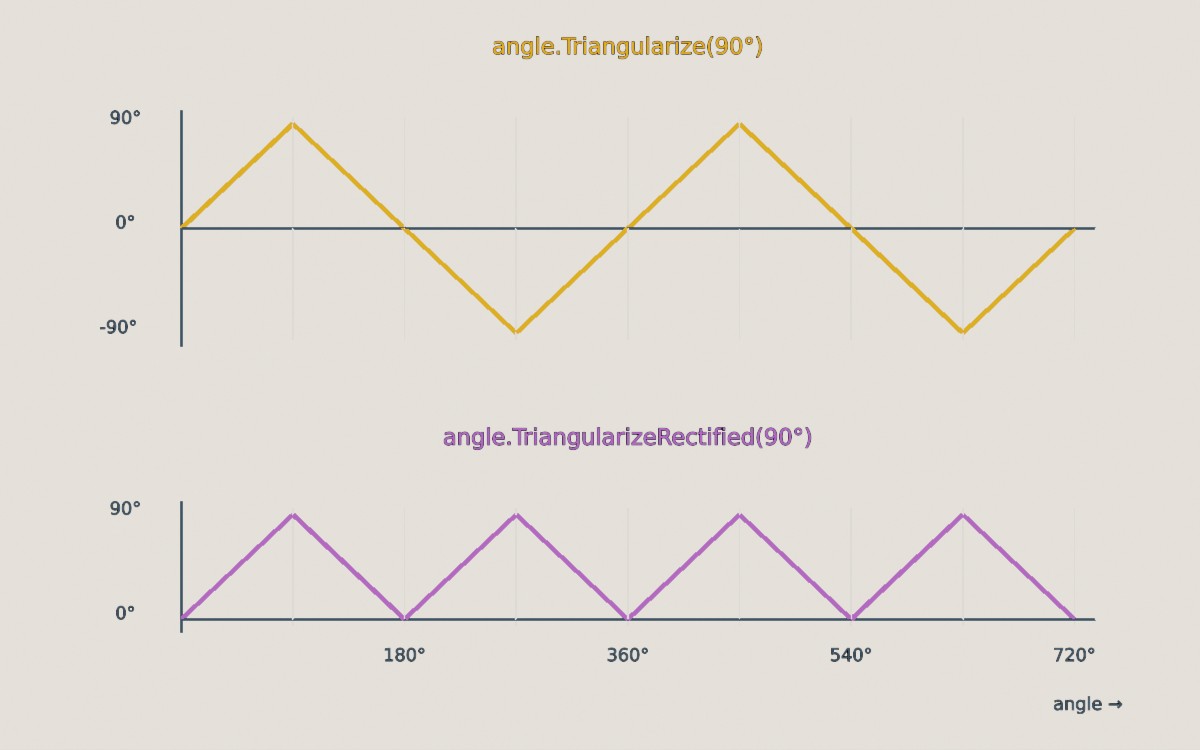
The output of Triangularize(90°) and TriangularizeRectified(90°) as the input angle increases from 0° to 720°.
-
Angle.Interpolate(start, end, distance)/Angle.InterpolateShortestPath(start, end, distance) -
An angle
distanceof the way fromstarttoend.Interpolate()treats the angles as plain numbers, whereasInterpolateShortestPath()takes the shorter way around the circle. For example, halfway from 0° to 270° is 135° withInterpolate(), but 315° withInterpolateShortestPath().
Angles also support the usual arithmetic and comparison operators: +, -, * and / (by a float), and <, >, <=, >=.
Comparing Angles
== compares angles exactly, so 0° and 360° are not equal, even though they point the same way around a circle. Use IsEquivalentWithinCircleTo() to check whether two angles point the same way (e.g. 0° and 360°, or 90° and 450°), and Equals(other, tolerance) to allow for small floating-point errors. See Equality for more on comparing values.
Rotation#
A Rotation is a turn of some Angle around an axis (a Direction). For example, a rotation of 90° around Up turns something that faces Forward so that it faces Left.
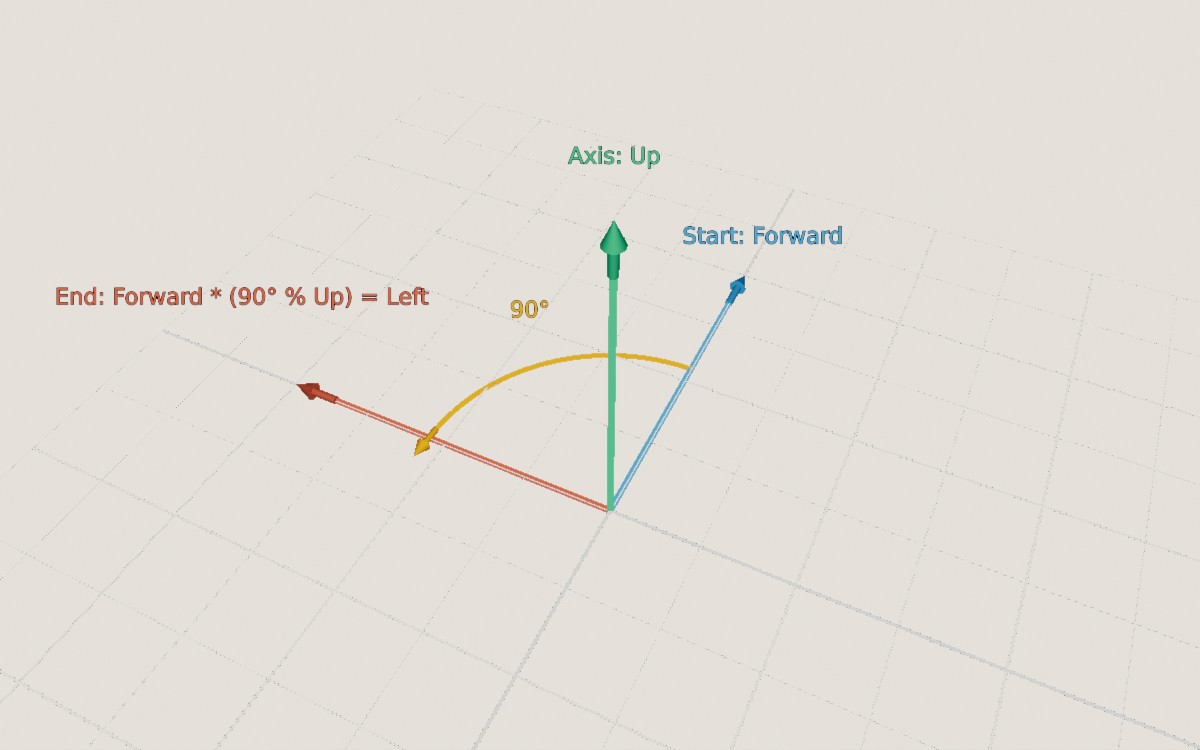
A rotation (the yellow object) of 90° around Up. Looking down on the Up rotation axis (i.e. with the axis pointing towards you), positive angles turn anticlockwise: Forward turns in to Left.
Positive angles turn anticlockwise when the axis is pointing towards you (or equivalently, clockwise when looking along the axis). Negative angles turn the other way.
var turn = new Rotation(90f, Direction.Up); // (1)!
var sameTurn = 90f % Direction.Up; // (2)!
var between = direction1 >> direction2; // (3)!
var bigger = turn with { Angle = 180f }; // (4)!
var none = Rotation.None; // (5)!
-
A rotation of 90° around
Up. -
The same rotation, written with the
%operator (read as "90° around Up").Direction.Up % 90fis equivalent. -
The rotation that turns
direction1in todirection2(by the shortest turn). Equivalent toRotation.FromStartAndEndDirection(direction1, direction2)anddirection1.RotationTo(direction2). -
A copy of
turnwith a different angle (Axiscan be changed the same way). -
A rotation that does nothing.
Don't Confuse Rotations with Orientations
It's easy to think of a Rotation as describing which way something is facing, but that's wrong. Actually, a Rotation describes how to change which way something is facing. For example, "Facing forward" is a direction/orientation; "turn 90° to the left" is a rotation.
Put another way: A rotation of 180° around Left turns a teacup upside-down. Applying the same rotation again turns it the right way up again: The rotation is the same both times, but its effect depends on which way the teacup was facing to begin with.
Applying Rotations#
var rotatedDirection = direction * rotation; // (1)!
var rotatedVect = vect * rotation; // (2)!
var rotatedLocation = location.RotatedBy(rotation, pivot); // (3)!
myObject.RotateBy(rotation); // (4)!
-
Rotates a direction. Equivalent to
direction.RotatedBy(rotation)androtation.Rotate(direction). -
Rotates a
Vect(keeping its length). -
Rotates a location around a pivot point.
-
Rotates an object in the scene (see Scene Objects). Cameras, lights, and most other world objects can be rotated in the same way.
Combining & Modifying Rotations#
var combined = rotation1 + rotation2; // (1)!
var undone = -rotation; // (2)!
var half = rotation * 0.5f; // (3)!
var difference = rotation1.NormalizedDifferenceTo(rotation2); // (4)!
-
A single rotation equivalent to applying
rotation1and thenrotation2. The order matters: In general, turning one way and then another doesn't give the same result as doing the two turns the other way round. Equivalent torotation1.CombinedAndNormalizedWith(rotation2). -
The opposite rotation (the same angle in the other direction), which undoes
rotation. Equivalent torotation.Reversed. -
A rotation around the same axis by half the angle.
rotation / 2fis equivalent. -
The rotation that, applied after
rotation1, givesrotation2.
-
WithAngleIncreasedBy(angle)/WithAngleDecreasedBy(angle) -
The same axis, with a larger or smaller angle.
-
WithAxisRotatedBy(otherRotation) -
The same angle, around an axis that has itself been rotated by
otherRotation. -
Normalized -
An equivalent rotation with an angle between 0° and 180°. (Turning by 270° around one axis is the same as turning by 90° around the opposite axis.)
-
Rotation.FromStartAndEndOrientation(startForward, startUp, endForward, endUp) -
The rotation that turns something facing
startForward(withstartUpas its up direction) so that it facesendForward(withendUpas its up). UnlikeFromStartAndEndDirection(), this also controls the "roll" around the facing direction, which is needed to fully align objects and cameras. -
AngleAroundAxis(axis) -
How far this rotation turns things around
axis(which needn't be its own axis), as a signed angle. For example, "how much does this rotation spin something around the up direction?" -
Rotation.Interpolate(start, end, distance) -
A rotation that is between
starttoend, at the normalizeddistance, interpolated such that it turns at a constant rate at everydistance.AccuratelyInterpolate()always uses the precise (but slower) method, andApproximatelyInterpolate()the faster approximation, which is only accurate when the two rotations are within about 90° of each other.Interpolate()picks between them for you.
Comparing Rotations
The same turn can be described in more than one way. For example, 90° around Left and -90° around Right both have exactly the same effect, as do 0° and 360° around any axis. == compares the angle and axis exactly, so it treats these as different.
IsEquivalentForAllDirectionsTo(other)checks whether two rotations always have the same effect.IsEquivalentForSingleDirectionTo(other, direction)checks whether two rotations have the same effect on one particular direction.- The
^operator gives the angle between two rotations (e.g. how different they are). See Equality for more on comparing values.
Rotation Internals
Internally, 3D graphics usually represent rotations as versors. TinyFFR uses an angle and axis because they're far easier to understand and harder to misuse, but quaternions/versors can be faster when applying the same rotation many times or combining many rotations.
rotation.ToQuaternion() and Rotation.FromQuaternion() convert between the two (as System.Numerics.Quaternion), and many TinyFFR methods that accept a Rotation also accept a Quaternion directly.
See more here: Quaternion vs Rotation.
Orientation#
The orientation enums give names to the 26 directions that point along, or exactly between, the three axes, such as Left, UpForward, or RightDownBackward. They're useful when you want to refer to a general direction by name, rather than as a precise Direction.
| Enum | Values | Examples |
|---|---|---|
CardinalOrientation |
The 6 directions along a single axis | Left, Up, Backward |
IntercardinalOrientation |
The 12 directions between two axes | LeftUp, DownForward, RightBackward |
DiagonalOrientation |
The 8 directions between all three axes | LeftUpForward, RightDownBackward |
Orientation |
All 26 of the above | Left, LeftUp, LeftUpForward |
XAxisOrientation / YAxisOrientation / ZAxisOrientation |
The two directions along one axis | Left / Right, Up / Down, Forward / Backward |
Axis |
The three axes themselves (without a sign) | X, Y, Z |
Every enum also has a None value. The names are always written in X, Y, Z order (e.g. LeftUpForward, never UpLeftForward).
var direction = Orientation.LeftUp.ToDirection(); // (1)!
var nearest = someDirection.NearestOrientation.AsEnum; // (2)!
var combined = Orientation.Left | Orientation.Up; // (3)!
var cameraLeft = camera.GetRelativeOrientationDirection(Orientation.Left); // (4)!
-
The
Directionthat points the named way (here, halfway between left and up).Direction.FromOrientation(Orientation.LeftUp)is equivalent. -
The named orientation closest to
someDirection.NearestOrientation.AsDirectiongives it as aDirection.NearestOrientationCardinal,NearestOrientationIntercardinal, andNearestOrientationDiagonalrestrict the choice to one kind. -
The orientation enums are flags, so they can be combined:
Left | UpisLeftUp. -
The direction that's left relative to the camera (i.e. taking which way it's facing in to account), rather than the world's
Left.
-
IsCardinal()/IsIntercardinal()/IsDiagonal() -
Whether an
Orientationlies along one axis, between two, or between all three. -
GetXAxis()/GetYAxis()/GetZAxis()/GetAxisSign(axis)/WithAxisSign(axis, sign) -
Inspect or change an orientation one axis at a time. For example,
Orientation.LeftUp.GetXAxis()isXAxisOrientation.Left, and its sign alongAxis.Zis0. -
AsGeneralOrientation() -
Converts a
CardinalOrientation,IntercardinalOrientation,DiagonalOrientation, or per-axis orientation to the equivalentOrientation. -
OrientationUtils.CreateOrientation(x, y, z)/OrientationUtils.CreateOrientationFromValueSigns(x, y, z) -
Builds an
Orientationfrom three per-axis orientations, or from the signs of three numbers (e.g.(1, -2, 0)givesLeftDown). The per-axis orientations can also be combined withPlus():XAxisOrientation.Left.Plus(YAxisOrientation.Up)isLeftUp.
To loop over every value of a kind, use OrientationUtils.All3DOrientations, AllCardinals, AllIntercardinals, AllDiagonals, or AllAxes. Direction.AllCardinals (and so on) list the same orientations as Directions. Each All[...] property does not include None.
2D equivalents (Orientation2D, DiagonalOrientation2D, etc.) are used for things like canvas placement and render sub-areas.