Transform
-
 In a nutshell...
- A
Transformcombines aScaling, aRotation, and aTranslation(movement), always applied in that order. Transform - Every model instance has a
Transform, and transforms can also be applied toLocations andBoundedRays. Applying Transforms - Transforms can be combined in to a single transform with
*, and converted to and fromMatrix4x4. Combining Transforms, Matrices
- A
Transform#
A Transform describes three operations combined in to one:
Scaling: AVectgiving how much to stretch or shrink along each axis (e.g.(2, 1, 1)doubles the width);Rotation: ARotationgiving how to turn;Translation: AVectgiving how far to move (translation is the mathematical term for movement).
The three are always applied in that order: First the scaling, then the rotation, and finally the translation (movement). Scaling and rotation happen around the transformation origin (usually the world origin, or the object's own position), so the order matters. For example, stretching something along the X axis and then turning it gives a different result from turning it and then stretching it along the X axis.
transform.To2D() converts a transform to a Transform2D, the 2D equivalent.
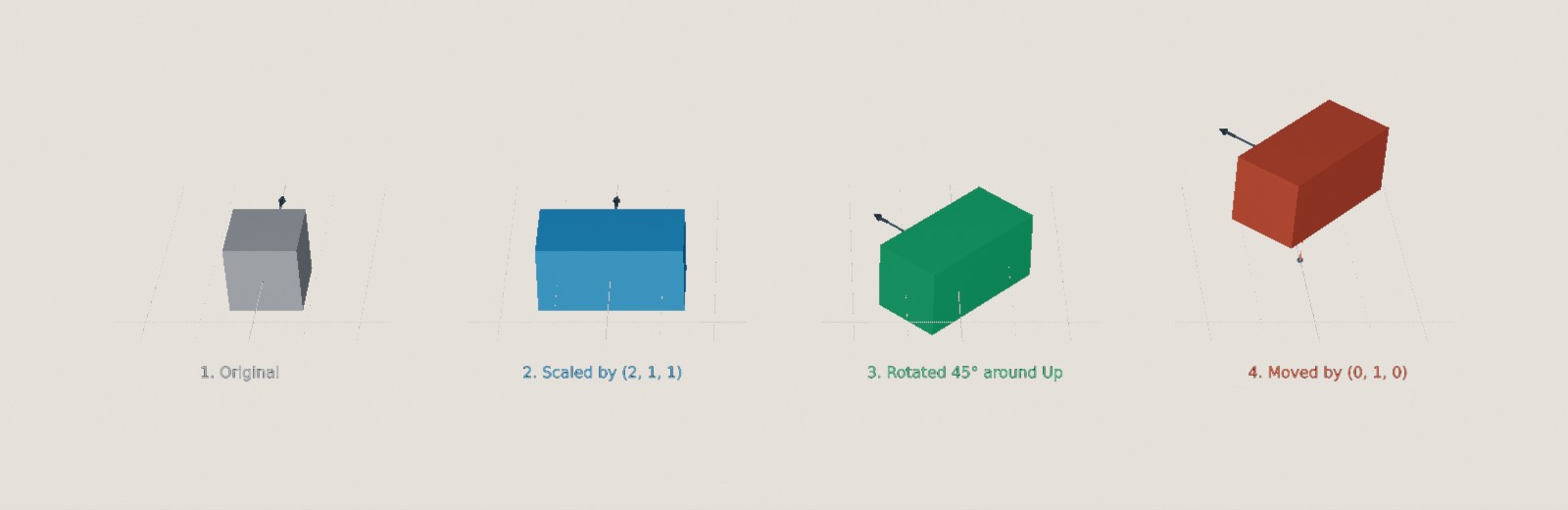
A transform with a Scaling of (2, 1, 1), a Rotation of 45° around Up, and a Translation of (0, 1, 0), applied to a cube one step at a time.
var transform = new Transform( // (1)!
    translation: new Vect(0f, 1f, 0f),
    rotation: 45f % Direction.Up,
    scaling: new Vect(2f, 1f, 1f)
);
var moveOnly = Transform.FromTranslationOnly(new Vect(0f, 1f, 0f)); // (2)!
var turnOnly = Transform.FromRotationOnly(45f % Direction.Up); // (3)!
var doubleSize = Transform.FromScalingOnly(2f); // (4)!
var none = Transform.None; // (5)!
var withoutScaling = transform with { Scaling = Vect.One }; // (6)!
-
The transform shown in the image above. Each argument is optional, and defaults to no change (no movement, no rotation, and a scaling of
(1, 1, 1)). -
A transform that only moves things.
-
A transform that only rotates things.
-
A transform that only scales things, by the same amount on every axis. Pass a
Vectto scale each axis by a different amount. -
A transform that does nothing (i.e. no movement, no rotation, and a scaling of
(1, 1, 1)). -
A copy of
transformwith its scaling reset.TranslationandRotationcan be changed the same way.
A transform can also be deconstructed in to its three parts: var (translation, rotation, scaling) = transform;.
Applying Transforms#
Every model instance has a Transform, made up of its Position (the translation), Rotation, and Scaling:
instance.Transform = transform; // (1)!
var copy = factory.ObjectBuilder.CreateModelInstance(model, instance.Transform); // (2)!
-
Sets the instance's position, rotation, and scaling all at once. Equivalent to
instance.SetTransform(transform). -
Creates a new instance of
modelwith the same position, rotation, and scaling asinstance.
Transforms can also be applied to some math types:
var transformedLocation = location * transform; // (1)!
var aroundPivot = location.TransformedBy(transform, pivot); // (2)!
var transformedRay = boundedRay.TransformedAroundMiddleBy(transform); // (3)!
var undone = transformedLocation.TransformedByInverseOf(transform, Location.Origin); // (4)!
-
locationscaled and rotated around the world origin, then moved by the transform's translation. Equivalent tolocation.TransformedAroundOriginBy(transform)andtransform.AppliedTo(location). -
The same, but scaling and rotating around
pivotinstead of the world origin. -
A
BoundedRayscaled and rotated around its own middle, then moved. (boundedRay * transformscales and rotates around its start point instead.) -
The original
locationagain. Applying the inverse of a transform undoes it (by moving back, turning back, and then un-scaling).transform.InverseAppliedTo(transformedLocation)is equivalent.Note that floating-point error accrual means that anything transformed and then transformed again in inverse will almost never match exactly with the original value.
Transformation Origins
Scaling and rotation always happen around some point, the transformation origin, which doesn't move. For a model instance, this is the origin of its mesh, so a transform's rotation turns an instance on the spot rather than swinging it around the world origin.
For a Location, the transformation origin is the world origin unless you pass a different one, so location * transform will usually move the location even if the transform has no translation (e.g. rotating (1, 0, 0) 90° around Up gives (0, 0, -1)).
Combining Transforms#
var combined = first * second; // (1)!
var moreRotation = transform.WithAdditionalRotation(90f % Direction.Up); // (2)!
var bigger = transform.WithScalingMultipliedBy(2f); // (3)!
var moved = transform.WithAdditionalTranslation(new Vect(0f, 0f, 1f)); // (4)!
var halfway = Transform.Interpolate(start, end, 0.5f); // (5)!
-
A single transform equivalent to applying
firstand thensecond. Equivalent tofirst.TransformedBy(second). As with rotations the order matters;second's scaling and rotation also apply tofirst's translation (e.g. iffirstmoves something 1m up andseconddoubles its size, the combined transform moves it 2m up). -
transformwith a further rotation of 90° aroundUpadded after its own rotation. -
transformwith its scaling doubled.WithScalingAdjustedBy()adds to the scaling instead. -
transformwith an extra 1m of forward movement. -
The transform halfway between
startandend(with each of the scaling, rotation, and translation interpolated separately).
Matrices#
3D graphics usually represent transforms as 4x4 matrices. TinyFFR's Transform converts to and from System.Numerics.Matrix4x4:
-
The transform as a matrix. Equivalent to
transform.ToMatrix(). -
A transform created from a matrix. Equivalent to
new Transform(matrix).
A Transform is normally stored as its separate Scaling, Rotation, and Translation, so you always get back exactly the values you put in. However, a transform created from a matrix is stored as a matrix instead, as is one created by combining two transforms (unless the second one only moves things, with no rotation or scaling). IsInternallyRepresentedByMatrix tells you which is the case.
A matrix-represented transform still has exactly the right effect when applied to something, and its Translation is always exact. But its Scaling and Rotation have to be worked out from the matrix, so they may not be the values you'd expect; and when a non-uniform scaling and a rotation have been combined, no single scaling and rotation can describe the result exactly, so reading them back only gives an approximation.
Transform.CoerceToComponentRepresentation(ref transform) and Transform.CoerceToMatrixRepresentation(ref transform) switch a transform between the two forms.