Shapes
-
 In a nutshell...
- A
Planeis an infinite flat surface, defined by the direction it faces (itsNormal) and where it sits. Plane SphereandCuboiddescribe a shape's size only, centred on the origin. Sphere, CuboidPositionedSphere,PositionedCuboid, andPositionedRotatedCuboidplace a shape somewhere in the world. Positioned Shapes
- A
Plane#
A Plane is a flat surface that extends forever in every direction along its surface, splitting the world in to two halves. It's defined by:
- Its
Normal: TheDirectionpointing straight out of its surface; - Its
PointClosestToOrigin: The point on the plane closest to the world origin, (0, 0, 0).
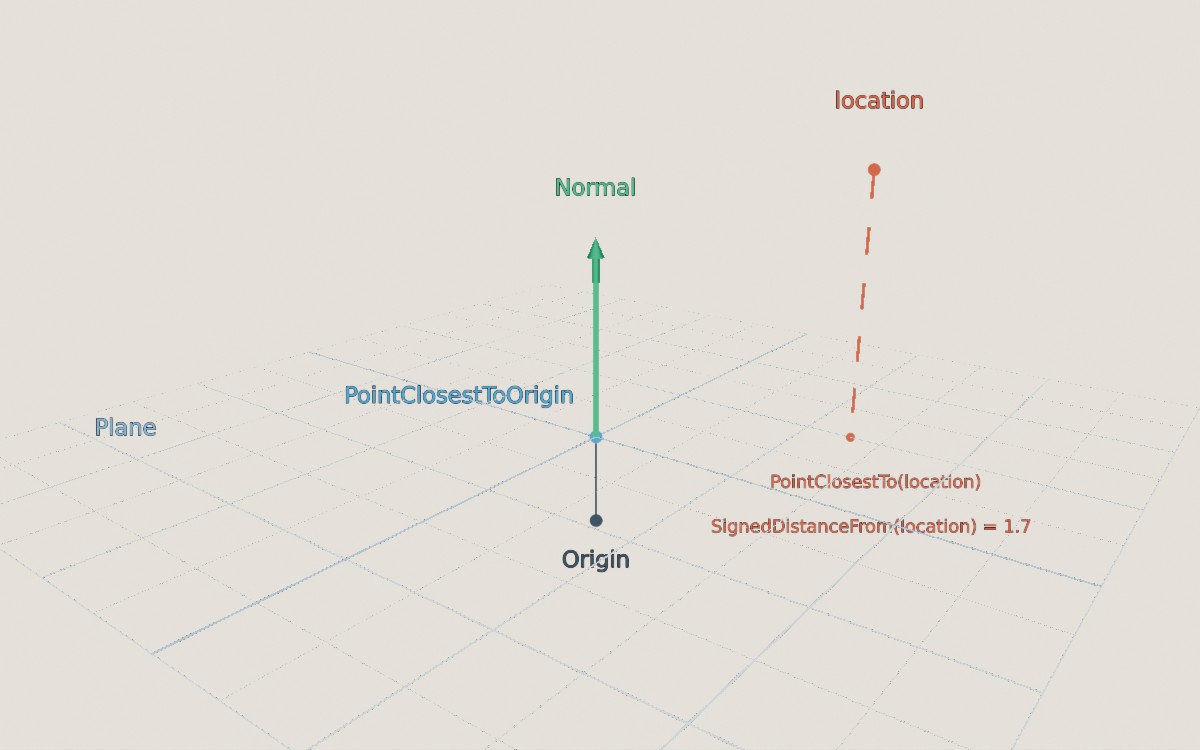
A plane facing Up, 0.6m above the origin. The red location above it is 1.7m away on the side the Normal points towards, so its signed distance is positive.
var ground = new Plane(Direction.Up); // (1)!
var tabletop = new Plane(Direction.Up, new Location(0f, 1f, 0f)); // (2)!
var raised = new Plane(Direction.Up, 1f); // (3)!
var fromTriangle = Plane.FromTriangleOnSurface(location1, location2, location3); // (4)!
var fromPoint = Plane.FromPointClosestToOrigin(location, normalFacesOrigin: true); // (5)!
-
A plane facing up, passing through the origin (i.e. the ground at height 0).
-
A plane facing up, passing through the given location (any point on the plane will do).
-
A plane facing up, 1m from the origin along its normal. A negative distance puts it on the other side of the origin.
-
The plane that all three locations lie on, or
nullif they're in a straight line (or the same point). The normal faces towards whichever side the three points appear in anticlockwise order from. -
The plane whose closest point to the origin is
location, facing either towards the origin or away from it. Returnsnulliflocationis the origin itself (as no single plane is defined).
Using Planes#
var signedDistance = plane.SignedDistanceFrom(location); // (1)!
var inFront = plane.FacesTowards(location); // (2)!
var onSurface = plane.Contains(location); // (3)!
var closest = plane.PointClosestTo(location); // (4)!
var bounced = plane.ReflectionOf(direction); // (5)!
var alongSurface = plane.ParallelizationOf(direction); // (6)!
-
How far
locationis from the plane. Returns a positive value on the side theNormalpoints towards, negative on the other side.DistanceFrom()gives the same value without the sign. -
Whether
locationis on the side of the plane theNormalpoints towards.FacesAwayFrom()checks the other side. (Locations on the plane itself returnfalsefrom both.) -
Whether
locationlies on the plane (allowing for a small thickness, as with lines; pass a differentplaneThicknessif needed). -
The point on the plane directly "under"
location. -
The direction "bounced" off the plane (e.g. a direction pointing down-and-right that hits a floor becomes up-and-right). Returns
nullif the direction is parallel to the plane.ReflectionOf()also accepts aVect,Ray, orBoundedRay. -
The direction flattened on to the plane's surface (or
nullif it points straight in to or out of the plane).OrthogonalizationOf()turns it to point straight out of the plane instead, andProjectionOf(vect)flattens aVect(keeping only its part that runs along the surface).
-
Flipped -
The same plane facing the opposite way (so its two sides swap and
Normalpoints the opposite way). The unary-operator does the same:-plane. -
IncidentAngleWith(direction)/AngleTo(direction) -
IncidentAngleWith()is the angle between a direction and the plane'sNormal(so 0° means hitting the plane head-on), ornullif the direction runs parallel to the plane.AngleTo()is the angle between the direction and the plane's surface (so 0° means running parallel to it).AngleTo()also accepts another plane (as does the^operator:plane1 ^ plane2). -
MovedBy(vect)/RotatedBy(rotation, pivot)/RotatedAroundOriginBy(rotation) -
Moves or rotates the plane.
plane + vectandplane * (rotation, pivot)are equivalent shorthands. -
CreateDimensionConverter() -
Creates a
DimensionConverterfor converting between 3D locations on the plane and 2D coordinates on its surface.
Sphere#
A Sphere is a ball of a given Radius, centred on the origin. To put it somewhere in the world, see Positioned Shapes.
var ball = new Sphere(0.5f); // (1)!
var oneLitre = Sphere.FromVolume(0.001f); // (2)!
var bigger = ball * 2f; // (3)!
var unit = Sphere.UnitSphere; // (4)!
-
A sphere with a radius of 0.5m (i.e. 1m across).
-
A sphere with a volume of 0.001m³ (1 litre).
FromDiameter(),FromCircumference(), andFromSurfaceArea()work the same way. -
A sphere with double the radius. Equivalent to
ball.ScaledBy(2f). -
A sphere with a radius of 1m.
OneMeterDiameterSphereandOneMeterCubedVolumeSphereare also available.
-
Radius/Diameter/Circumference/SurfaceArea/Volume -
The sphere's measurements, in metres (or square/cubic metres).
-
TrySplit(plane, out circleCentre, out circleRadius) -
If
planecuts through the sphere, returnstrueand gives the circle where the two meet.GetCircleRadiusAtDistanceFromCenter(distance)gives the same circle's radius for a planedistancemetres from the sphere's centre.
Cuboid#
A Cuboid is a box of a given Width (along the X axis), Height (along Y), and Depth (along Z), centred on the origin.
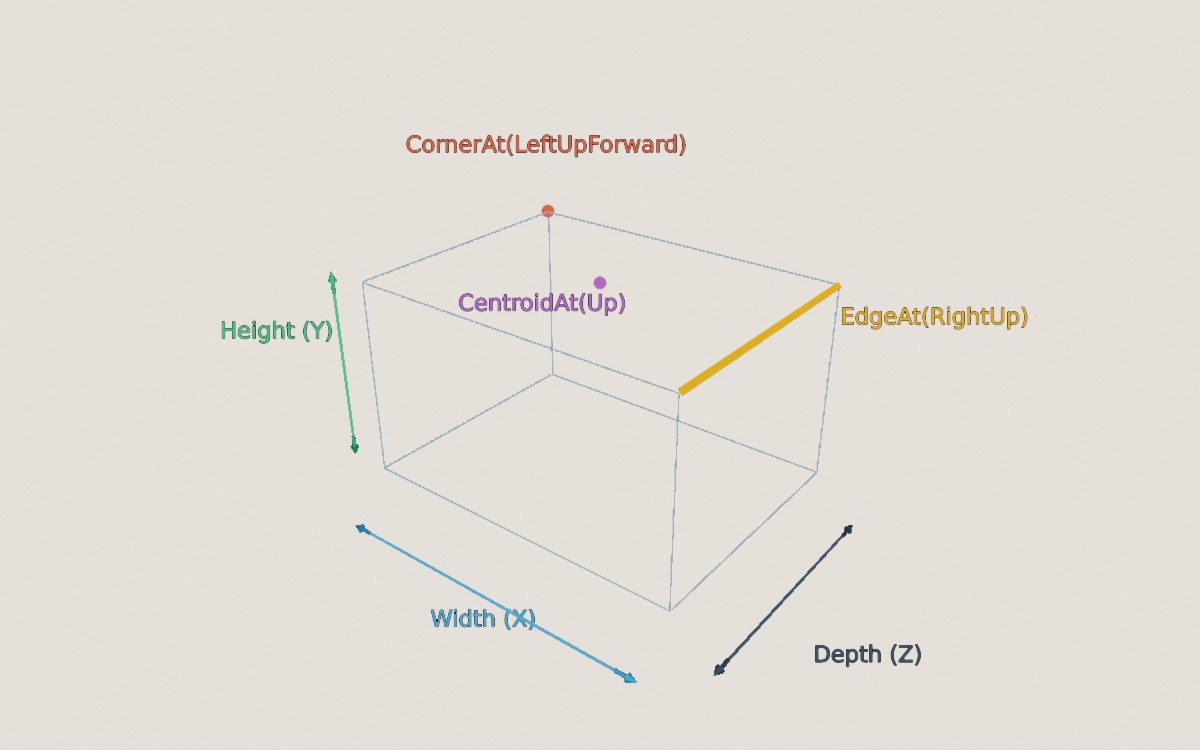
A Cuboid's dimensions, and some of its parts as returned by CornerAt(), EdgeAt(), and CentroidAt().
var crate = new Cuboid(1f); // (1)!
var shelf = new Cuboid(2f, 0.05f, 0.4f); // (2)!
var fromHalves = Cuboid.FromHalfDimensions(1f, 0.025f, 0.2f); // (3)!
var bigger = shelf * 2f; // (4)!
-
A 1m cube.
-
A box 2m wide, 5cm tall, and 40cm deep.
-
The same box as
shelf, created from half of each dimension (i.e. the distance from the centre to each side). -
A box with every dimension doubled.
ScaledBy(vect)scales each axis separately.
Each corner, edge, and side of a cuboid can be found using the orientation enums:
-
CornerAt(DiagonalOrientation) -
The location of one of the 8 corners (e.g.
CornerAt(DiagonalOrientation.LeftUpForward)). -
EdgeAt(IntercardinalOrientation) -
One of the 12 edges, as a
BoundedRay(e.g.EdgeAt(IntercardinalOrientation.RightUp)is the top edge on the right-hand side). -
SideAt(CardinalOrientation)/CentroidAt(CardinalOrientation) -
One of the 6 sides, as a
Planefacing outwards; or the centre point of that side. -
Corners/Edges/Sides/Centroids -
Every corner, edge, side, or side-centre, for looping over (e.g.
foreach (var corner in crate.Corners)). -
Extents/HalfExtents/Volume/SurfaceArea -
The width, height, and depth as a
Vect(or half of each); and the box's volume and surface area.GetExtent(Axis)gives the size along a single axis. -
WithVolume(volume)/WithSurfaceArea(area)/WithAllExtentsAdjustedBy(amount) -
The box resized to have the given volume or surface area (keeping its proportions), or with
amountadded to every dimension.
Positioned Shapes#
Sphere and Cuboid only describe a shape's size. To place one in the world, use a positioned shape:
| Type | Describes |
|---|---|
PositionedSphere |
A Sphere at a Position |
PositionedCuboid |
A Cuboid at a Position, lined up with the world axes |
PositionedRotatedCuboid |
A Cuboid at a Position, turned by a Rotation |
var ball = new PositionedSphere(0.5f, new Location(0f, 1f, 0f)); // (1)!
var crate = new Cuboid(1f).ToPositionedCuboid(new Location(2f, 0.5f, 0f)); // (2)!
var tiltedCrate = new PositionedRotatedCuboid(new Cuboid(1f), location, 45f % Direction.Up); // (3)!
var movedBall = ball + new Vect(0f, 1f, 0f); // (4)!
-
A 0.5m-radius sphere centred at (0, 1, 0). (
new Sphere(0.5f).ToPositionedSphere(location)is equivalent.) -
A 1m cube centred at (2, 0.5, 0).
-
A 1m cube centred on
locationand turned 45° aroundUp. -
The sphere moved up by 1m. A
PositionedRotatedCuboidcan also be rotated (around its own centre) withRotatedBy(rotation)or* rotation.
Positioned shapes have the same properties and methods as the shape they're based on, measured in world space (e.g. crate.CornerAt(DiagonalOrientation.LeftUpForward) returns the corner's location in the world). For a PositionedRotatedCuboid, the orientation names refer to the box's own (unrotated) sides, so CornerAt(DiagonalOrientation.LeftUpForward) is the corner that was left-up-forward before the box was rotated.
Positioned shapes are used for shape scene queries (finding every object inside a region).
Translated Shape Wrappers
The positioned shapes are built on two general-purpose wrappers: TranslatedConvexShape<T> (any shape plus a position) and TranslatedRotatedConvexShape<T> (any shape plus a position and rotation). The positioned shapes convert implicitly to and from these wrappers, which are mostly useful when writing generic code that works with any shape type.
Measuring & Intersecting#
All shapes (positioned or not) share the same set of measuring and intersecting operations:
var inside = ball.Contains(location); // (1)!
var distance = ball.DistanceFrom(location); // (2)!
var surfaceDistance = ball.SurfaceDistanceFrom(location); // (3)!
var closest = ball.PointClosestTo(location); // (4)!
var surfacePoint = ball.SurfacePointClosestTo(location); // (5)!

var hits = ball.IntersectionWith(ray); // (6)!
var isHit = ball.IsIntersectedBy(ray); // (7)!
var bounced = ball.ReflectionOf(ray); // (8)!
var side = ball.RelationshipTo(plane); // (9)!
-
Whether
locationis inside the shape. -
How far
locationis from the shape (0 if it's inside). -
How far
locationis from the shape's surface (which isn't 0 for locations inside the shape). -
The point in the shape closest to
location(locationitself, if it's inside). -
The point on the shape's surface closest to
location. -
Where a line, ray, or bounded ray enters and leaves the shape (
hits.Value.Firstandhits.Value.Second), ornullif it misses.Secondisnullwhen there's only one point (e.g. when the ray starts inside the shape). See also Lines: Planes & Shapes. -
Whether a line, ray, or bounded ray touches the shape at all.
-
The ray bounced off the shape's surface, starting where it first hits (or
nullif it misses).IncidentAngleWith(ray)gives the angle between the ray and the surface's normal where it hits. -
Which side of
planethe shape is on:PlaneIntersectsObject(the plane cuts through it),PlaneFacesTowardsObject(the shape is on the side the plane'sNormalpoints towards), orPlaneFacesAwayFromObject.SignedDistanceFrom(plane)gives the distance from the plane to the nearest part of the shape: 0 if the plane cuts through it, and negative if the shape is on the side the plane'sNormalpoints away from.
Related Pages
- Positioned shapes can be drawn in a scene as scene primitives (e.g.
scene.AddPrimitiveShape(ball)), as can planes. - Meshes and model instances report their bounding boxes as positioned shapes (
PositionedCuboid,PositionedRotatedCuboid, andPositionedSphere). - Meshes can be generated from a
CuboidorSphere, or from arbitrary flat shapes using thePolygontype.