Point Lights
-
 In a nutshell...
- A point light emits light from a single position in every direction, like a light bulb. Point Lights
- Point lights have a colour, a brightness, and a maximum radius. Brightness, Colour, Range
- You can optionally enable shadows at increased performance cost. Shadows
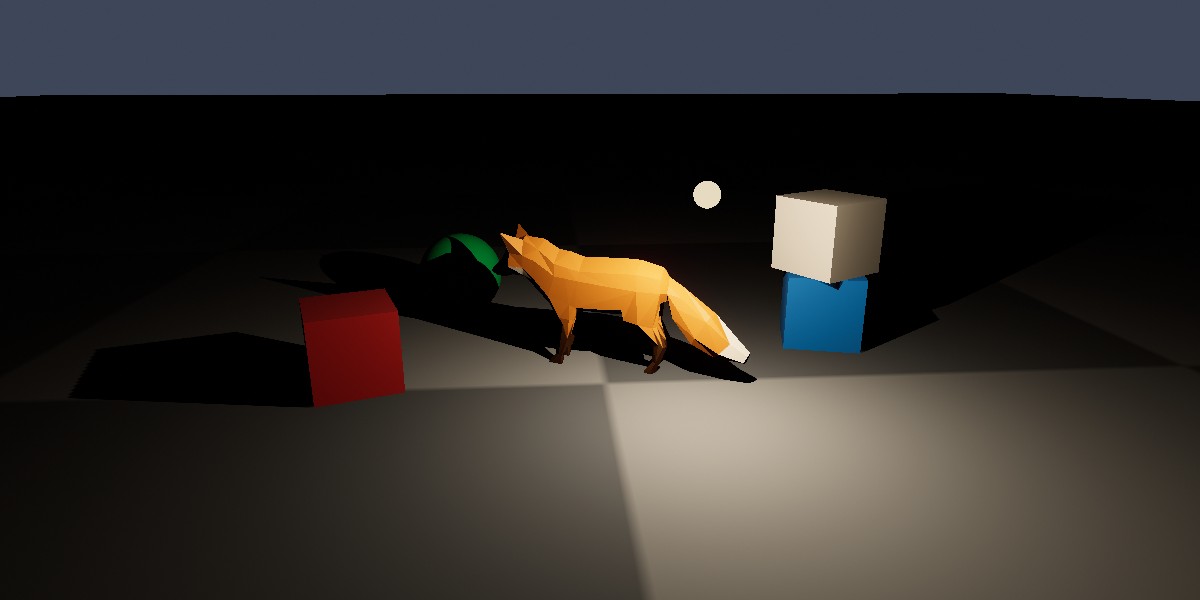
A warm point light (marked by the small glowing sphere) lighting a fox and several objects in an otherwise dark scene, with shadows enabled.
Point Lights#
using var light = factory.LightBuilder.CreatePointLight( // (1)!
    new Location(0f, 2f, 0f),
    StandardColor.LightingIncandescentBulb
);
scene.Add(light); // (2)!

light.MoveBy(new Vect(1f, 0f, 0f)); // (3)!
light.Brightness = 0.5f; // (4)!
-
Creates a point light at (0, 2, 0), with the warm colour of an incandescent light bulb.
-
Adds the light to a scene. A light only illuminates the scenes it has been added to.
-
Moves the light 1 unit to the right.
-
Reduces the light's brightness.
A PointLight emits light from a single position equally in every direction, like a light bulb or a candle flame. Objects close to the light are lit more strongly than those further away.
Like objects, lights must be added to a scene before they have any effect, and a single light can be added to several scenes. Lights are resources, so must be disposed when no longer needed.
Creating Point Lights#
Point lights are created with factory.LightBuilder.CreatePointLight(), which accepts the following optional parameters (or alternatively a PointLightCreationConfig with equivalent properties):
-
position -
Where the light is. Defaults to the origin.
-
color -
The colour of the light. Defaults to white. See Colour.
-
brightnessPreset -
How much light the light emits, as a real-world light source (e.g.
PointLightBrightnessPreset.Candle). Ignored ifbrightnessis also specified. See Brightness. -
brightness -
How much light the light emits. Defaults to
1f(a typical household light bulb). See Brightness. -
maxIlluminationRadius -
How far the light reaches, in metres. Defaults to
15f. See Range. -
castsShadows -
Whether objects lit by the light cast shadows. Defaults to
false. See Shadows. -
name -
An optional name for the light.
Each of these can also be changed at any time after creation via the light's properties (e.g. light.Position, light.Color).
Brightness#
Every light's Brightness is a relative value, where 1f is the default strength for that kind of light. This makes it easy to adjust lights of different kinds in the same terms ("half as bright", "twice as bright").
light.Brightness = 2f;
light.ScaleBrightnessBy(1.5f); // (1)!
light.AdjustBrightnessBy(-1f); // (2)!
-
Multiplies the brightness by 1.5 (so
2fbecomes3f). -
Adds -1 to the brightness (so
3fbecomes2f). The result never goes below0f.
The default values for brightness are set up to co-ordinate with the default value of the camera's exposure. For more information, see Exposure & Brightness.
Colour#
A light's Color tints the light itself, not the objects it falls on. A red light leaves a white surface looking red; but a surface that reflects no red at all stays dark no matter how bright the light is.
StandardColor has a number of presets for common real-world light sources (StandardColor.LightingCandle, LightingIncandescentBulb, LightingSunRiseSet, LightingSunMidday, LightingAmbientDaylight, LightingAmbientOvercast, and LightingAmbientShaded).
A light's colour can also be adjusted in terms of hue, saturation, and lightness via its ColorHue, ColorSaturation, and ColorLightness properties (and the corresponding AdjustColor[...]By() methods).
Range#
A real light never quite stops illuminating things however far away they are; but calculating a contribution too faint to see is wasted work. A point light's MaxIlluminationRadius is therefore the distance (in metres) beyond which it contributes no light at all.
Setting this too small for the light's brightness produces a visible edge where the light abruptly cuts off. Setting it unnecessarily large wastes rendering time on objects the light barely affects.
Shadows#
Setting a light's CastsShadows to true makes the objects it lights cast shadows from it:
Shadows are calculated separately for each light that casts them, and are one of the more expensive things a scene can ask for. It's therefore common to enable shadows only for the one or two lights that most define a scene's look, and leave the rest without shadows.
The quality of shadows (and whether they're rendered at all) is set per renderer, via the ShadowQuality and ShadowsEnabled properties of its RenderQualityConfig; see Render Quality.