Conventions
This page lists the conventions TinyFFR follows throughout its API.
3D Axes & Units#
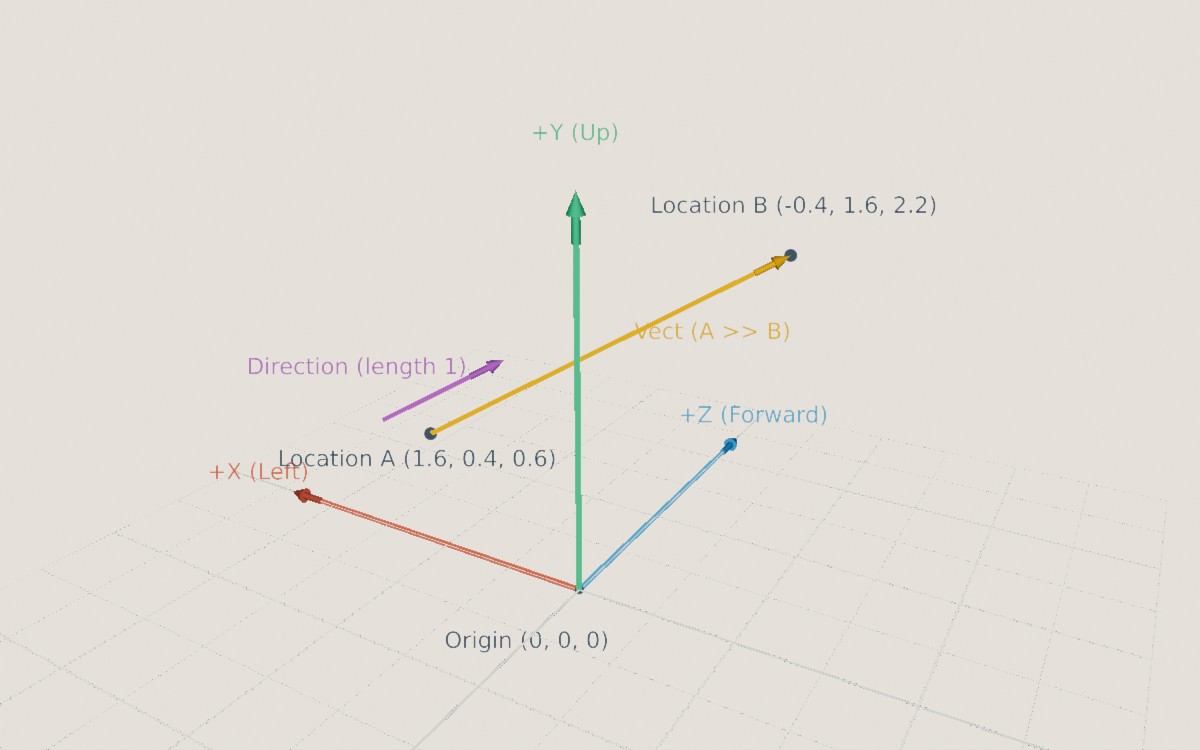
TinyFFR's 3D axes. See Vector Types for more on locations, directions, and vects.
- The world (and every model's own local space) uses a right-handed coordinate system:
+Xpoints left;+Ypoints up;+Zpoints forward.
- Distances are in metres. This is only a convention (nothing stops you treating 1 unit as something else), but TinyFFR's lighting is calibrated assuming it: Lights fade with distance in metres, and the built-in brightness presets assume real-world-sized scenes.
- Durations are in seconds: Typically a
float(e.g. "deltaTime"). Direction.FromDualOrthogonalization(a, b)(andVector3.Cross) follow the right-hand rule: Point your index finger alongaand your middle finger alongb, and your thumb points along the result (e.g.LeftandUpgiveForward).
Angles & Rotations#
- Angles are in degrees (an
Anglecan be created from radians withAngle.FromRadians(), and read back in radians withangle.Radians). See Angle. - A 3D
Rotationis an angle around an axis. Positive angles turn anticlockwise when the axis points towards you (or equivalently, clockwise when looking along the axis). For example, 90° aroundUpturnsForwardin toLeft. See Rotation. - 2D rotations (e.g. in a
Transform2D, or a canvas object'sRotation) also turn anticlockwise for positive angles. - 2D angles that describe a direction (e.g.
XYPair<T>.PolarAngle,Angle.From2DPolarAngle()) are polar: 0° points right, 90° up, 180° left, and 270° down.
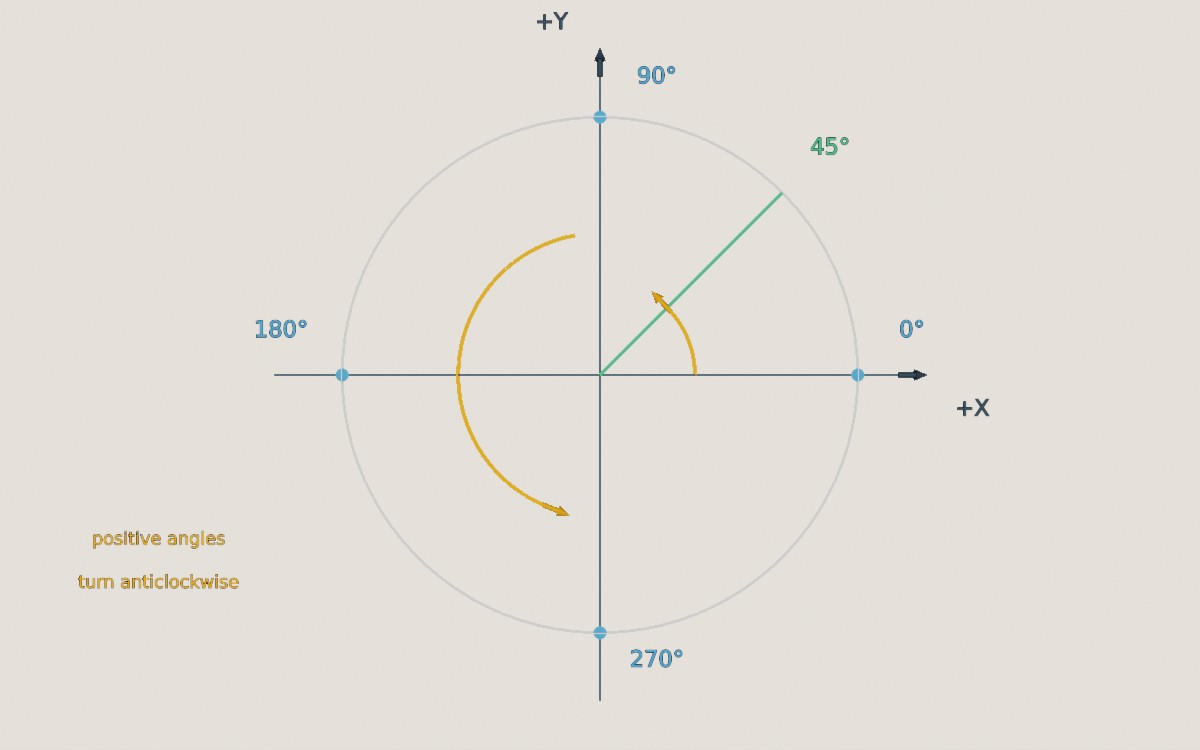
2D polar angles: 0° points along +X (right), and angles increase anticlockwise.
2D Coordinates#
Different 2D coordinate systems are used in different places:
- 2D math (e.g.
XYPair<T>as a vector,Transform2D, andDimensionConverter) follows the usual mathematical convention:+Xis right and+Yis up. - Pixel coordinates on windows and displays, including the mouse cursor's position (
MouseCursorPosition) and its movement (MouseCursorDelta), start from the top-left corner, so+Xis right and+Yis down. The renderer's ray casting, pixel-picking, and projecting methods use the same top-left origin by default (and let you choose a different corner). - Canvas objects are positioned relative to a chosen corner or edge of the canvas (see Placement).
- Normalized near-plane coordinates (used by
Cameramethods such asCreateRayFromNearPlane()) have(0, 0)at the centre of the camera's image,(-1, -1)at the bottom-left, and(1, 1)at the top-right.
Textures#
- Texture coordinates (UVs) start at the bottom-left corner of the texture:
(0, 0)is the bottom-left and(1, 1)the top-right. - Texel data is laid out row by row, starting from the bottom row (see Creating Textures From Texel Data). The same applies to frames read back from a render output buffer, unless you ask for them top-to-bottom.
- Colours in textures are sRGB, whereas colours given directly to lights, backdrops, and fog are linear (see Colour Spaces).
- Normal maps are expected in OpenGL format (pass
isDirectXFormat: truewhen loading DirectX-format maps):+X(red) points along the mesh's tangent direction;+Y(green) points along the mesh's bitangent direction;+Z(blue) points out of the surface. TinyFFR ignores the blue channel and reconstructsZfrom the red and green channels.
- In ORM maps, the occlusion channel's maximum value means no occlusion (fully lit by ambient light), and its minimum value means fully occluded.
Meshes#
- Front-facing triangles and polygons have their vertices in anticlockwise order (as seen from the front). Back faces aren't drawn, so a triangle wound the wrong way is invisible from the side you expect to see. Polygons can be marked as clockwise with
IsWoundClockwiseif necessary.
Matrices#
TinyFFR follows System.Numerics' matrix conventions:
- Matrices are row-major and transform row vectors (i.e. a location is transformed with
Vector3.Transform(location, matrix), and matrices combine left-to-right in the order they're applied). - A
Transform's matrix is its scaling, then rotation, then translation:Matrix4x4.CreateScale(scaling) * Matrix4x4.CreateFromQuaternion(rotation) * Matrix4x4.CreateTranslation(translation). - A camera's own local axes have
+Xpointing to the camera's right,+Yalong its up direction, and+Zbackwards (the camera looks along its local-Z).CameraUtils.CalculateModelMatrix(),CalculateViewMatrix(),CalculatePerspectiveProjectionMatrix(), andCalculateOrthographicProjectionMatrix()calculate the same matrices TinyFFR uses for its cameras;camera.GetModelMatrix()andcamera.GetProjectionMatrix()return a camera's current ones.
API Naming#
TinyFFR's math API follows a few naming patterns, which can help you guess what a method does:
- Types are immutable: Methods return a new value rather than changing the one they're called on. Methods that return a modified copy are named in the past tense, e.g.
RotatedBy(),ScaledBy(),ProjectedOnTo(),ReflectedBy(). ToXyz()methods convert a value to something else (possibly losing information, e.g.ray.ToLine()), whereasAsXyz()methods reinterpret the same data as something else (e.g.direction.AsVect()).Equals()and==compare values exactly (or within atolerance, forEquals()), whereasIsEquivalent...To()methods check whether two values mean the same thing even if they're stored differently (e.g.rotation.IsEquivalentForAllDirectionsTo()).- When an input might not have a meaningful answer (e.g. the intersection of two lines that never meet), the method returns
nullrather than throwing an exception. Many such methods have aFast...()version (e.g.FastIntersectionWith()) that skips the check for extra speed, and gives an undefined result if there's no answer. - Static factory methods are named after how they create the value, e.g.
Rotation.FromStartAndEndDirection()andColorVect.FromRgb24(). - TinyFFR uses US English spellings in its API (e.g.
Color,Normalized), and avoids the word "entity", so as not to clash with your own entity-component system.