Vector Types
-
 In a nutshell...
- TinyFFR has three 3D vector types:
Location(a point in space),Vect(a movement with a length), andDirection(a way of pointing, with no length). The Three Vector Types - All three share common features: Component access,
System.Numericsinterop, parsing and formatting, and random generation. Common Features
- TinyFFR has three 3D vector types:
The Three Vector Types#
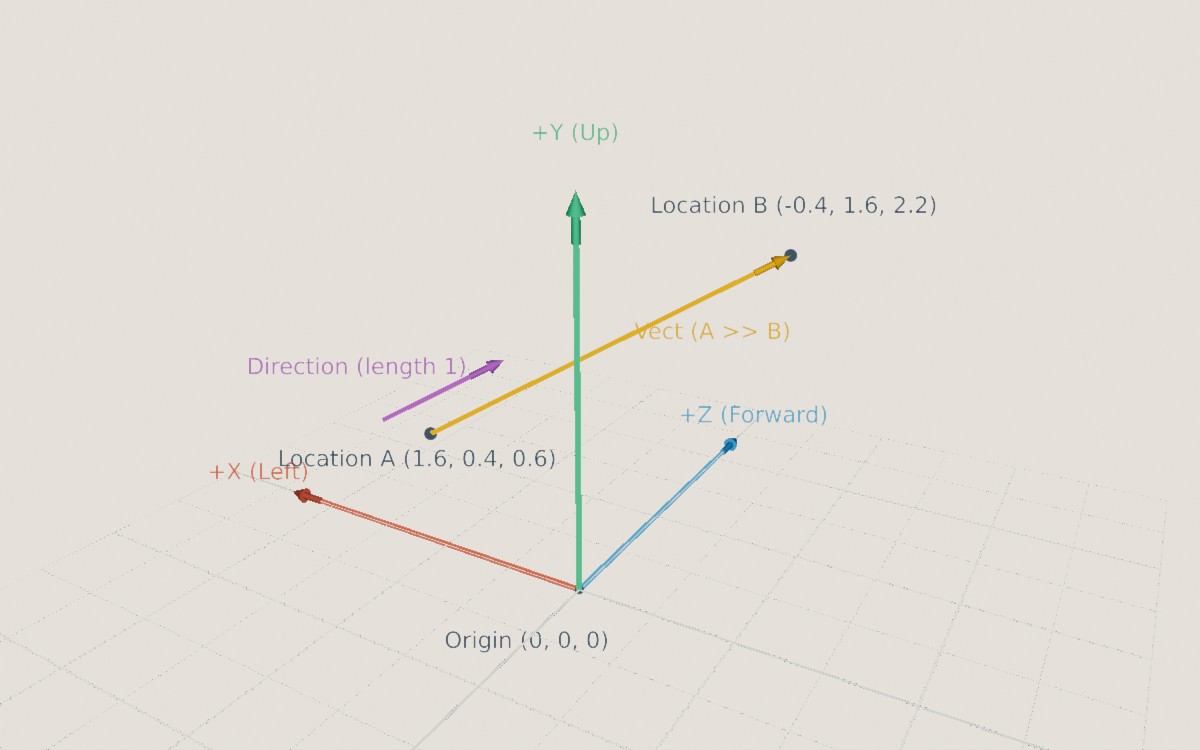
TinyFFR's 3D axes: +X points left, +Y points up, and +Z points forward. Locations A and B are points in space; the Vect from A to B describes the movement between them (including its length); and the Direction points the same way with no particular length (it's drawn here with length 1).
Everything in a TinyFFR scene is positioned along three axes, X, Y, and Z, that are all at right-angles to each other. By default +X points left, +Y points up, and +Z points forward, and distances are measured in metres. The point where all three axes meet, (0, 0, 0), is the origin.
Many math libraries use a single "vector" type for everything; TinyFFR separates them by intent.
| Type | Represents | Has a position? | Has a length? | Example |
|---|---|---|---|---|
Location |
A point in space | Yes | No | Where an object is |
Vect |
A movement or offset | No | Yes | How far, and which way, an object moved this frame |
Direction |
A way of pointing | No | No (always 1) | Which way a camera is looking |
For example, adding two Locations together makes no sense (what is "London plus Paris"?), so TinyFFR doesn't allow it; but adding a Vect to a Location (moving a point) does, and gives another Location. Subtracting one Location from another gives the Vect between them, and a Vect has a Direction (and a length).
Why 'Vect' instead of 'Vector'?
- .NET already defines types named
Vector(andVector3etc.) inSystem.Numerics, and other libraries you're using alongside TinyFFR may define one too. - "Vector" also commonly means a resizable list in programming.
LocationandDirectionare technically vectors as well;Vectis specifically the vector that's neither a point nor a pure direction.
All three types are small, immutable structs. Every operation returns a new value rather than modifying the existing one.
Location#
A Location is a single point in space.
var a = new Location(1f, 2f, 3f); // (1)!
Location b = (1f, 2f, 3f); // (2)!
var origin = Location.Origin; // (3)!
var c = a with { Y = 0f }; // (4)!
-
A point 1m along X (left), 2m along Y (up), and 3m along Z (forward) from the origin.
-
The same point, converted implicitly from a tuple.
-
The origin,
(0, 0, 0). -
A copy of
awith a differentYvalue.
var moved = location + vect; // (1)!
var vectBetween = location1 >> location2; // (2)!
var directionTo = location1.DirectionTo(location2); // (3)!
var distance = location1.DistanceFrom(location2); // (4)!
var rotated = location.RotatedBy(rotation, pivot); // (5)!
-
Moves
locationbyvect.location - vectmoves it the opposite way, andlocation.MovedBy(vect)is equivalent. -
The
Vectthat moveslocation1tolocation2. Equivalent tolocation1.VectTo(location2),location2 << location1, andlocation2 - location1. -
The
Directionfromlocation1towardslocation2. -
The distance between the two locations, in metres.
-
Rotates the location around
pivot.
-
VectTo(other)/VectFrom(other) -
The
Vectthat moves this location toother(or movesotherto this location). -
DirectionTo(other)/DirectionFrom(other) -
The
Directionfrom this location towardsother(or fromothertowards this location). If the two locations are the same, the result isDirection.None. -
DistanceFrom(other)/DistanceSquaredFrom(other)/DistanceFromOrigin()/DistanceSquaredFromOrigin() -
The distance between this location and another (or the origin). The squared versions skip a square root, so are faster when you only need to compare distances (e.g. to find which object is nearest).
-
IsWithinDistanceOf(other, distance) -
Whether this location is no more than
distancefromother. -
RotatedBy(rotation, pivot)/RotatedAroundOriginBy(rotation) -
Rotates this location around a pivot point (or the origin). The
*operator with a(pivot, rotation)tuple does the same:location * (pivot, rotation). -
ScaledFromOriginBy(scalar) -
Moves this location towards or away from the origin, scaling its distance by
scalar(or by aVect, scaling each axis separately). -
TransformedBy(transform, transformationOrigin)/TransformedAroundOriginBy(transform) -
Applies a
Transform(scaling, rotation, and translation) to this location, around a given origin point (or the world origin).TransformedByInverseOf()andTransformedAroundOriginByInverseOf()undo a transform. -
Clamp(min, max) -
The closest point to this location on the straight line between
minandmax. (This isn't a per-axis clamp; to clamp a location inside a box, usePositionedCuboid.FromOppositeCorners(min, max).ClosestPointTo(location).) -
Location.Interpolate(start, end, distance) -
A location
distanceof the way along the straight line fromstarttoend(e.g.0.5fis halfway).
Vect#
A Vect is a displacement through space; i.e. a direction and a length (magnitude).
var v = new Vect(1f, -2f, 0f); // (1)!
Vect fromTuple = (1f, -2f, 0f); // (2)!
var uniform = new Vect(3f); // (3)!
var fromDirection = Direction.Up * 3f; // (4)!
var zero = Vect.Zero; // (5)!
-
A movement of 1m along +X (left), 2m along -Y (down), and nothing along Z.
-
The same
Vect, converted implicitly from a tuple. -
A
Vectwith all three components set to3f, i.e.(3, 3, 3). Useful for uniform scaling. -
A movement of 3m upwards. Equivalent to
Vect.FromDirectionAndDistance(Direction.Up, 3f). -
No movement at all,
(0, 0, 0).Vect.Oneis(1, 1, 1).
var length = vect.Length; // (1)!
var direction = vect.Direction; // (2)!
var sum = vect1 + vect2; // (3)!
var doubled = vect * 2f; // (4)!
var capped = vect.WithMaxLength(5f); // (5)!
var rotated = vect * rotation; // (6)!
-
How far the
Vectmoves, in metres. -
Which way the
Vectpoints.Direction.Noneif theVectisVect.Zero. -
The combined movement of moving along
vect1and thenvect2. Subtracting (vect1 - vect2) moves alongvect1and then the reverse ofvect2. -
A
Vectpointing the same way but twice as long.vect / 2fhalves it. -
The same
Vect, shortened to 5m if it was any longer. -
The
Vectrotated by aRotation. Equivalent tovect.RotatedBy(rotation).
-
Length/LengthSquared -
The length of the
Vect, in metres.LengthSquaredskips a square root, so is faster when you only need to compare lengths. -
Direction -
The
DirectiontheVectpoints in. -
Reversed -
The same movement in the opposite direction. The unary
-operator does the same:-vect. -
Absolute/Reciprocal/MaxComponent/MinComponent/MaxComponentMagnitude/MinComponentMagnitude -
Per-component helpers:
Absolutemakes every component positive;Reciprocalis(1/X, 1/Y, 1/Z)(ornullif any component is zero); and theMax/Minproperties return the largest or smallest component (or the largest or smallest ignoring sign). -
WithLength(length)/WithLengthIncreasedBy(amount)/WithLengthDecreasedBy(amount)/WithMaxLength(length)/WithMinLength(length) -
A
Vectpointing the same way with a different length.AsUnitLength(orWithLengthOne()) sets the length to exactly 1. -
WithDirection(direction) -
A
Vectwith the same length, pointing indirectioninstead. -
ScaledBy(scalar)/ScaledBy(vect)/MultipliedBy(vect)/DividedBy(vect) -
Scales the
Vectby a number, or each component separately by the components of anotherVect. The*and/operators do the same:vect * 2f,vect * new Vect(1f, 2f, 1f). -
Dot(other)/Cross(other) -
The dot product and cross product with another
Vector aDirection. -
ProjectedOnTo(direction)/LengthWhenProjectedOnTo(direction) -
The part of this
Vectthat points alongdirection(e.g. how much of an object's velocity is directed forwards), or just that part's length. -
OrthogonalizedAgainst(direction)/ParallelizedWith(direction) -
This
Vectturned (keeping its length) so it's exactly at right-angles todirection, or exactly in line with it. These returnnullwhen there's no single answer (e.g. orthogonalizing against a direction theVectalready points along). See Directions for more detail. -
IsOrthogonalTo(other)/IsParallelTo(other)/IsApproximatelyOrthogonalTo(other)/IsApproximatelyParallelTo(other) -
Whether this
Vectis at right-angles to (or in line with) anotherVectorDirection. The exact versions are easily thrown off by tiny floating-point errors, so the approximate versions (which allow 0.1° of error by default) are usually the better choice. -
Clamp(min, max) -
The closest
Vectto this one on the straight line betweenminandmax(not a per-component clamp). -
Vect.Interpolate(start, end, distance) -
A
Vectdistanceof the way betweenstartandend.
Direction#
A Direction represents any direction in the world (or None) but has no intrinsic position or length of its own.
var forward = Direction.Forward; // (1)!
var diagonal = new Direction(1f, 1f, 0f); // (2)!
var towards = location1.DirectionTo(location2); // (3)!
var ofVect = vect.Direction; // (4)!
var none = Direction.None; // (5)!
-
One of the six built-in axis directions:
Forward,Backward,Up,Down,Left, andRight. -
A direction halfway between +X (left) and +Y (up). The values given are only the ratio between the axes; the actual
X,Y, andZare adjusted to make the length exactly 1 (here, roughly(0.71, 0.71, 0)). -
The direction pointing from one location towards another.
-
The direction a
Vectpoints in. -
The absence of any direction (all components zero). This is what you get from, e.g., the direction of
Vect.Zero.
var opposite = -direction; // (1)!
var angle = direction1 ^ direction2; // (2)!
var rotated = direction * rotation; // (3)!
var rotationBetween = direction1 >> direction2; // (4)!
var rotationAround = direction % 90f; // (5)!
var vect = direction * 3f; // (6)!
-
The opposite direction. Equivalent to
direction.Flipped. -
The angle between two directions, from 0° to 180°. Equivalent to
direction1.AngleTo(direction2). -
The direction rotated by a
Rotation. Equivalent todirection.RotatedBy(rotation). -
The
Rotationthat turnsdirection1in todirection2. Equivalent todirection1.RotationTo(direction2). -
A
Rotationof 90° arounddirection(as an axis).90f % directionis equivalent. -
A
Vectpointing alongdirectionwith a length of 3m.
-
AngleTo(other)/SignedAngleTo(other, clockwiseAxis) -
The angle between this direction and
other.AngleTo()is always between 0° and 180°;SignedAngleTo()also tells you which way round the angle goes (positive when turning from this direction tootheris a positive rotation aroundclockwiseAxis, i.e. clockwise when looking along it), so the result ranges from just over -180° to 180°. -
Dot(other)/Cross(other) -
The dot product and cross product with another
Directionor aVect. -
IsWithinAngleTo(other, angle) -
Whether this direction is no more than
angleaway fromother(e.g. whether an enemy is within a camera's field of view). -
AnyOrthogonal() -
Some direction at right-angles to this one. There are infinitely many; this always picks the same one for a given direction. Useful when you need "any perpendicular direction" and don't care which.
-
Direction.FromDualOrthogonalization(directionA, directionB) -
The direction at right-angles to both
directionAanddirectionB, following the right-hand rule (if your right index finger points alongdirectionAand your middle finger alongdirectionB, your thumb points along the result). -
OrthogonalizedAgainst(other)/ParallelizedWith(other) -
This direction adjusted so that it's exactly at right-angles to
other(orthogonalized), or exactly in line with it (parallelized, either the same way or the opposite way, whichever is closer). Both returnnullwhen there's no single answer: When orthogonalizing a direction against one it already points exactly along (or exactly against), or parallelizing it with one it's already exactly at right-angles to.OrthogonalizationOf()andParallelizationOf()do the same with the roles swapped. -
Direction.OrthogonalizeAll(primary, ref secondary, ref tertiary) -
Adjusts
secondaryandtertiaryso that all three directions are mutually at right-angles, without changingprimary. Useful for building a set of axes (e.g. forward, up, and right) from directions that are only roughly perpendicular. -
IsOrthogonalTo(other)/IsParallelTo(other)/IsApproximatelyOrthogonalTo(other)/IsApproximatelyParallelTo(other) -
Whether this direction is at right-angles to (or in line with) another. As with
Vect, the approximate versions are usually the better choice. -
Clamp(target, maxAngle)/Clamp(min, max)/Clamp(plane, arcCentre, maxAngle, retainOrthogonalDimension) -
Restricts this direction to within
maxAngleoftarget(i.e. within a cone); to the arc betweenminandmax; or to an arc on a plane. -
Direction.Interpolate(start, end, distance) -
A direction
distanceof the way fromstarttoend. Directions are interpolated by turning at a constant rate along the shortest arc between them, so the result is always a valid direction. -
Direction.FromPlaneAndPolarAngle(plane, zeroDegreesDirection, angle) -
The direction lying on
planethat isangleanticlockwise fromzeroDegreesDirection(when looking at the plane with its normal pointing towards you). -
NearestOrientation/NearestOrientationCardinal/NearestOrientationIntercardinal/NearestOrientationDiagonal -
The nearest of the named orientations (such as
Forward,UpLeft, orDownRightBackward) to this direction.Direction.FromOrientation()goes the other way, andDirection.AllCardinals,AllIntercardinals,AllDiagonals, andAllOrientationslist them.
Renormalizing
Each operation on a Direction keeps it at unit length, but very long chains of operations (e.g. rotating the same direction by a small amount every frame for hours) can slowly accumulate floating-point error. Direction.Renormalize(direction) corrects any drift.
If you already have components that you know are exactly unit length, Direction.FromVector3PreNormalized() skips the normalization done by the constructor (but produces an invalid Direction if the components aren't unit length).
Converting Between Types#
Converting between the three types is always explicit, because doing so changes what the value means:
var vectFromOrigin = location.AsVect(); // (1)!
var locationFromVect = vect.AsLocation(); // (2)!
var vectFromDirection = direction.AsVect(); // (3)!
var directionOfVect = vect.Direction; // (4)!

// Alternatively:
vect = (Vect) direction;
vect = (Vect) location;
location = (Location) direction;
location = (Location) vect;
-
The
Vectthat moves the origin tolocation. Equivalent to(Vect) location. -
The
Locationreached by movingvectaway from the origin. Equivalent to(Location) vect. -
A
Vectof length 1 pointing alongdirection;direction.AsVect(3f)(ordirection * 3f) gives a different length. -
The direction a
Vectpoints in.
Common Features#
All three types share the following features:
-
X/Y/Zandthis[Axis] -
The individual components. They can also be read with an indexer, e.g.
vect[Axis.Y]. Indexing with two axes gives anXYPair<float>(e.g.location[Axis.X, Axis.Z]), and indexing with three gives a new value with its components rearranged (e.g.vect[Axis.Z, Axis.Y, Axis.X]; a rearrangedDirectionis re-normalized). Values can also be deconstructed:var (x, y, z) = location;. -
ToVector3()/FromVector3(vector) -
Converts to and from
System.Numerics.Vector3, for use with other .NET or math libraries. -
ToString()/Parse(text)/TryParse(text, out result) -
Formats the value as text, such as
<1, 2, 3>, and parses it back.VectandDirectionalso offerToStringDescriptive(), which adds a description (e.g. aDirectionlists its nearest named orientation). -
Random() -
A random value.
Location.Random()andVect.Random()pick each component between -100 and 100 (or between two given values);Location.Random(shape)picks a point inside a shape.Direction.Random()picks any direction, and also has overloads that pick within a cone (Random(coneCentre, maxAngle)) or along a plane (Random(plane)). -
IsPhysicallyValid -
Whether the value is valid: All components are finite numbers (not infinity or
NaN), and for aDirection, its length is 1 (or it'sNone).Direction.IsPhysicallyValidAndNotNonealso excludesNone. -
==/Equals(other, tolerance) -
==compares values exactly. Because floating-point calculations often produce tiny rounding errors, comparing calculated values is usually better done with a tolerance:location1.Equals(location2, 0.001f).
Each type can also be serialized to and from bytes (SerializeToBytes() and DeserializeFromBytes()).
SphericalTranslation#
A SphericalTranslation describes a direction as an offset from a reference direction, made of two angles:
- The
PolarOffsetis how far (as an angle) the result tilts away from a reference "pole" direction. - The
AzimuthalOffsetis how far around the pole the result is turned (anticlockwise when the pole points towards you), starting from a reference "zero" direction.
var translation = new SphericalTranslation(azimuthalOffset: 90f, polarOffset: 30f); // (1)!
var result = translation.Translate(azimuthZero: Direction.Forward, polarZero: Direction.Up); // (2)!
-
An offset tilted 30° away from the pole, turned 90° around it.
-
Resolves the offset to a
Direction: Starting fromUp(the pole), tilt 30° towardsForward, then turn 90° anticlockwise aroundUp(when looking down on it).SphericalTranslation.ZeroZeroresolves to the pole direction itself.
This is a convenient way to describe directions relative to a surface, and is how TinyFFR describes the tilt of surface normals when creating normal maps (see Creating Textures).