Lines
-
 In a nutshell...
- TinyFFR has three "line-like" types:
Line(infinite in both directions),Ray(starts at a point, infinite in one direction), andBoundedRay(a segment from a start point to an end point). Line Types - All three share most of their API; finding closest points and distances, intersecting with each other and with shapes, and measuring angles. Measuring & Intersecting
- They can be moved, rotated, and (for
BoundedRay) scaled and resized. Moving & Modifying
- TinyFFR has three "line-like" types:
Line Types#
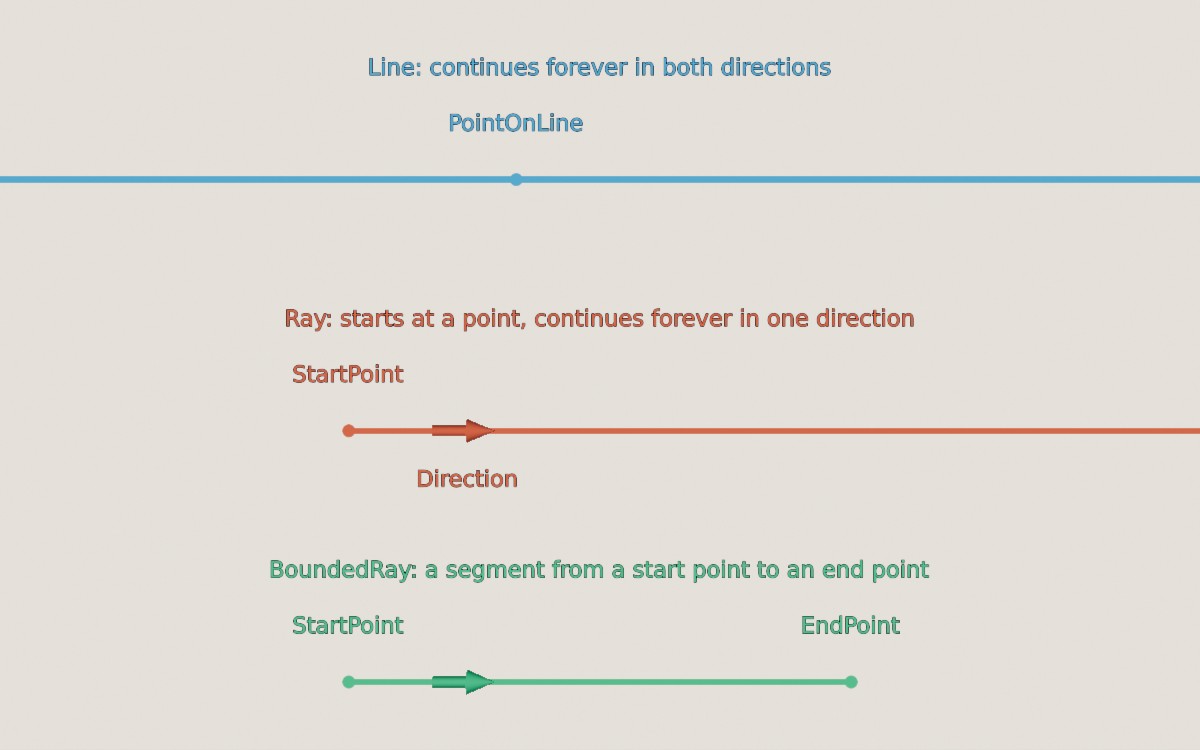
A Line, a Ray, and a BoundedRay.
Line#
A Line is an infinitely-long straight line. It's defined by any point on the line (PointOnLine) and a Direction; it has no start or end. It's considered the same line whichever point on it you pick and whichever way along it the direction points.
var line = new Line(new Location(0f, 1f, 0f), Direction.Forward); // (1)!
var throughTwoPoints = Line.FromTwoPoints(location1, location2); // (2)!
-
A line passing through (0, 1, 0), running forward (and backward).
-
The line passing through both locations.
Ray#
A Ray starts at a point (StartPoint) and continues forever in one Direction.
var ray = new Ray(new Location(0f, 1f, 0f), Direction.Forward); // (1)!
var cameraRay = camera.CreateRayFromNearPlane(); // (2)!
-
A ray starting at (0, 1, 0) and travelling forward.
-
A ray from the centre of the camera's view straight in to the scene. See Ray Casting.
BoundedRay#
A BoundedRay is like a ray but has both a StartPoint to an EndPoint. It has a Length and a MiddlePoint as well as a Direction (pointing from its start towards its end). Also known as a "line segment".
var ray = new BoundedRay(location1, location2); // (1)!
var alsoRay = new BoundedRay(location1, Direction.Up * 3f); // (2)!
-
A bounded ray from
location1tolocation2. -
A bounded ray from
location1to the point 3m above it (i.e. created from a start point and a Vect).
Converting Between Types#
var lineFromRay = ray.ToLine(); // (1)!
var boundedRayFromRay = ray.ToBoundedRay(5f); // (2)!
var rayFromBoundedRay = boundedRay.ToRayFromStart(); // (3)!
var rayFromLine = line.ToRay(0f, flipDirection: false); // (4)!
-
The infinite line that the ray lies along.
-
The first 5m of the ray.
-
A ray starting at the bounded ray's start point and continuing past its end.
ToRayFromEnd()gives a ray from the end point back past the start. -
A ray starting at
PointOnLine(or some distance along the line from it), pointing along the line'sDirection(or the opposite way, ifflipDirectionistrue).
Drawing Lines
All three types can be drawn in a scene as scene primitives (e.g. scene.AddPrimitiveShape(ray)), which is handy for checking that your math is doing what you expect.
Measuring & Intersecting#
Most operations work the same way on all three types, and accept any of the three types as an argument. For a Ray or BoundedRay, results only ever lie within the ray (e.g. the point on a ray closest to a location can be its start point, but never a point "behind" it).
var closest = ray.PointClosestTo(location); // (1)!
var distance = ray.DistanceFrom(location); // (2)!
var onRay = ray.Contains(location); // (3)!

var intersection = ray.IntersectionWith(otherLine); // (4)!
var closestOnOther = ray.ClosestPointOn(otherLine); // (5)!
var gap = ray.DistanceFrom(otherLine); // (6)!
var angle = ray.AngleTo(otherLine); // (7)!
-
The point on the ray closest to
location. -
How far
locationis from the ray (at its closest point). -
Whether
locationlies on the ray. -
The point where the ray meets
otherLine, ornullif they don't meet. (otherLinecan be aLine,Ray, orBoundedRay.) -
The point on
otherLineclosest to the ray.ray.PointClosestTo(otherLine)gives the point on the ray closest tootherLine. -
The shortest distance between the ray and
otherLine(0 if they intersect). -
The angle between the ray's direction and
otherLine's direction.
Line Thickness
Two lines in 3D space almost never pass exactly through the same point, because floating-point values can't represent every location precisely. So Contains(), IntersectionWith(), and IsIntersectedBy() treat lines as having a small thickness (ILineLike.DefaultLineThickness, 1cm).
You can pass a different lineThickness to any of these methods; and doing so lets you simulate spherical shape casting (i.e. you can do intersection tests against a cylindrical space).
-
IsIntersectedBy(other) -
Whether this line meets
other(another line-like or aPlane). Cheaper thanIntersectionWith()when you don't need to know where. To test against a shape, ask the shape instead:sphere.IsIntersectedBy(ray). -
SignedAngleTo(other, clockwiseAxis) -
The angle between this line and
other, positive or negative depending on which way roundclockwiseAxisit turns. -
IsParallelTo(other)/IsOrthogonalTo(other)/IsApproximatelyParallelTo(other)/IsApproximatelyOrthogonalTo(other) -
Whether this line points in the same (or opposite) direction as
other, or at right-angles to it.othercan be a line-like, aDirection, or aPlane. TheApproximatelyversions allow for a small angular error, optionally passed as atolerance. -
IsApproximatelyColinearWith(other) -
Whether this line and
otherlie along the same infinite line. -
UnboundedLocationAtDistance(distance)/BoundedLocationAtDistance(distance)/LocationAtDistanceOrNull(distance) -
The location
distancemetres along the ray from its start point (negative values go backwards). The unbounded version can return a location beyond the ray's ends, the bounded version clamps it to the nearest end, and theOrNullversion returnsnullif it's beyond the ends. On aLine,LocationAtDistance(distance)measures fromPointOnLine.
Planes & Shapes#
Line-likes can also be measured against and intersected with a Plane, and with shapes such as a Sphere or Cuboid.
var hitPoint = ray.IntersectionWith(plane); // (1)!
var hitAngle = ray.IncidentAngleWith(plane); // (2)!
var bounced = ray.ReflectedBy(plane); // (3)!
var pieces = boundedRay.SplitBy(plane); // (4)!
var shapeHits = ray.IntersectionWith(sphere); // (5)!
-
Where the ray hits the plane, or
nullif it doesn't. -
The angle between the ray and the plane's normal (so 0° is a head-on hit), or
nullif the ray doesn't hit the plane. -
The ray that bounces off the plane, starting where the ray hits it (or
nullif it doesn't). -
The bounded ray split in two where it crosses the plane, as a pair (
pieces.Value.Firstandpieces.Value.Second), ornullif it doesn't cross the plane. Splitting aRaygives aBoundedRayand aRay; splitting aLinegives twoRays. -
Where the ray enters and leaves the shape (
shapeHits.Value.FirstandshapeHits.Value.Second), ornullif it misses.Secondisnullif there's only one point, e.g. when the ray starts inside the shape.
Other plane operations include DistanceFrom(plane), SignedDistanceFrom(plane), RelationshipTo(plane), and ProjectedOnTo(plane) (moving the line on to the plane's surface).
Moving & Modifying#
Like every TinyFFR math type, line-likes are immutable; every method returns a new value, leaving the original unchanged.
var moved = ray + new Vect(0f, 1f, 0f); // (1)!
var rotated = ray * (90f % Direction.Up); // (2)!
var rotatedAroundPivot = ray * (90f % Direction.Up, pivot); // (3)!
var reversed = -boundedRay; // (4)!
var parallel = boundedRay.ParallelizedWith(Direction.Up); // (5)!
-
The ray moved up 1m. Equivalent to
ray.MovedBy(new Vect(0f, 1f, 0f)). -
The ray rotated 90° around
Up, pivoting around its start point (aroundPointOnLinefor aLine). See Rotation. -
The ray rotated 90° around
Up, pivoting aroundpivot. -
The bounded ray with its start and end swapped. Equivalent to
bounded ray.Flipped. -
The bounded ray rotated (around its start point) so that it points directly up, or
nullif there's no single answer (if the bounded ray is exactly at right-angles toUp).OrthogonalizedAgainst()does the same but rotates it to lie at right-angles instead. TheFastversions (e.g.FastParallelizedWith()) skip the check and never returnnull, but their result is undefined when there's no single answer.
BoundedRay has a few more options, as it has a length and a middle:
-
RotatedAroundStartBy(rotation)/RotatedAroundMiddleBy(rotation)/RotatedAroundEndBy(rotation) -
The bounded ray rotated around one of its own points, which stays fixed.
-
ScaledFromStartBy(scalar)/ScaledFromMiddleBy(scalar)/ScaledFromEndBy(scalar) -
The bounded ray's length multiplied by
scalar, keeping the named point fixed. A negativescalaralso flips its direction. -
WithLength(length)/WithLengthIncreasedBy(amount)/WithLengthDecreasedBy(amount)/WithMinLength(min)/WithMaxLength(max) -
The bounded ray with a new length, keeping its start point and direction fixed (so only its end point moves).
-
ParallelizedAroundMiddleWith(direction)/OrthogonalizedAroundEndAgainst(direction)/ ... -
Like
ParallelizedWith()andOrthogonalizedAgainst(), but pivoting around a different point of the bounded ray. -
TransformedAroundStartBy(transform)/TransformedAroundMiddleBy(transform)/TransformedAroundEndBy(transform) -
The bounded ray with a
Transform(scaling, rotation, and translation) applied to it, around one of its own points.bounded ray * transformis equivalent toTransformedAroundStartBy(transform).
Comparing Lines
Because a Line has no start or end, == returns true for two lines that lie along the same infinite line, even if they were created with different points or opposite directions.
Ray and BoundedRay are compared exactly by their start point and direction (and end point). Use Equals(other, tolerance) to allow for small floating-point errors. See Equality for more on comparing values.